qc
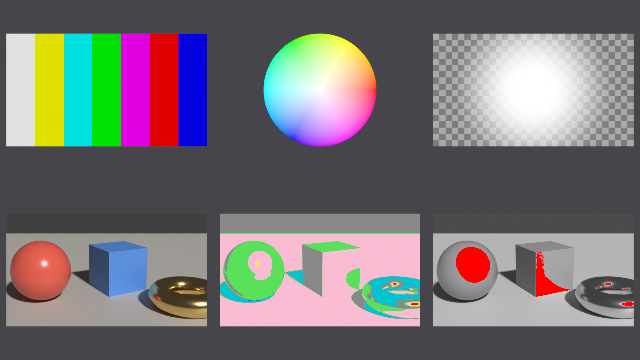
Compositor quality control after Nuke: the test patterns of its image generators (SMPTE colour bars at 75 %, colour wheel, ramp, radial, rectangle, grid, checkerboard, constant) and the checks of an image (false colour by stops of luminance, clip check above 1 and below 0, NaN and infinity check, zebra, alpha over a checker, difference as heat)
| Targets | blender-compositor |
|---|---|
| Version | 0.13.1 (edition 2026) |
| Depends on | grade, mask2d, merge |
| Import | use qc or use qc (name, …) |
| Source | stdlib/qc.bn · example examples/qc_showcase.bn |
Quality control in the compositor, after Nuke: the image generators of test patterns, and the checks a compositor runs on an image to see what its viewer hides. A pattern takes the size of the image it is given, whose pixels it does not read. Its places are in pixels (grid, checkerboard, counted from the bottom-left pixel) or in the image's uniform coordinates, as mask2d draws: the origin at the image's center, y up, its larger side from -1 to 1. Its colours are premultiplied: a pattern drawn on part of the image is transparent elsewhere. A check reads the values as they are in the buffer, premultiplied; its picture is opaque, but for zebra, which leaves the image as it is outside its stripes, and the image of the alpha check. The luminance is Rec. 709's. NaN is not equal to itself, but the compositor's Compare, which tests |a - b| <= ε, finds it so, and min and max return their other operand when one is NaN: NaN is told by max(x, -1) < min(x, 1), which no number gives. A value past ±10³⁰ counts as infinite: an image written by Python is clamped to ±3.4 × 10³⁸, while an infinity made in the graph stays one.
Helpers#
color times#
The colour times k on the four channels: drawn where k is 1, transparent where it is 0
compositor graph "color times"(color: Color, k: Float = 1.0) -> Color| Input | Type | Default | Range |
|---|---|---|---|
color | Color | ||
k | Float | 1.0 |
frame#
1 on every pixel of the image, whatever its values, NaN among them: a pattern takes its size from it
compositor graph frame(image: Color) -> Float| Input | Type | Default | Range |
|---|---|---|---|
image | Color |
half extent#
Half the width and half the height of the image in its uniform coordinates: the larger one is 1
compositor graph "half extent"(image: Color) -> Vector| Input | Type | Default | Range |
|---|---|---|---|
image | Color |
pixel of#
The column and row of each pixel, from 0 at the bottom-left, as Floats
compositor graph "pixel of"(image: Color) -> Vector| Input | Type | Default | Range |
|---|---|---|---|
image | Color |
soft edge#
1 where d is below edge - softness, 0 past edge, a smoothstep between them
compositor graph "soft edge"(d: Float, edge: Float, softness: Float in 0.0..) -> Float| Input | Type | Default | Range |
|---|---|---|---|
d | Float | ||
edge | Float | ||
softness | Float | 0.0.. |
clamp01#
x clamped between 0 and 1; 0 for NaN
compositor graph clamp01(x: Float) -> Float| Input | Type | Default | Range |
|---|---|---|---|
x | Float |
Patterns#
constant#
The colour on every pixel, of the image's size
compositor graph constant(image: Color, color: Color = (0.18, 0.18, 0.18, 1.0)) -> Color| Input | Type | Default | Range |
|---|---|---|---|
image | Color | ||
color | Color | (0.18, 0.18, 0.18, 1.0) |
color bars#
SMPTE's seven bars at 75 % (level): white, yellow, cyan, green, magenta, red, blue, from left to right, each a seventh of the width
compositor graph "color bars"(image: Color, level: Float = 0.75 in 0.0..1.0) -> Color| Input | Type | Default | Range |
|---|---|---|---|
image | Color | ||
level | Float | 0.75 | 0.0..1.0 |
color wheel#
A disk filling the image's smaller side: its hue turns around the center, red to the right, then green and blue counterclockwise; its saturation grows outwards from white
compositor graph "color wheel"(image: Color, value: Float = 1.0 in 0.0..) -> Color| Input | Type | Default | Range |
|---|---|---|---|
image | Color | ||
value | Float | 1.0 | 0.0.. |
ramp#
From one colour to the other across the whole image, along angle: 0 from left to right, 90° from bottom to top; at 45° from corner to corner
compositor graph ramp(
    image: Color,
    from: Color = (0.0, 0.0, 0.0, 1.0),
    to: Color = (1.0, 1.0, 1.0, 1.0),
    angle: Float(subtype: ANGLE)
) -> Color| Input | Type | Default | Range |
|---|---|---|---|
image | Color | ||
from | Color | (0.0, 0.0, 0.0, 1.0) | |
to | Color | (1.0, 1.0, 1.0, 1.0) | |
angle | Float |
radial#
White in a disk of the uniform coordinates, transparent outside: it falls off from radius × (1 - softness) to the radius by a smoothstep
compositor graph radial(
    image: Color,
    center: Vector = (0.0, 0.0),
    radius: Float = 0.5 in 0.0..,
    softness: Float = 0.5 in 0.0..1.0
) -> Color| Input | Type | Default | Range |
|---|---|---|---|
image | Color | ||
center | Vector | (0.0, 0.0) | |
radius | Float | 0.5 | 0.0.. |
softness | Float | 0.5 | 0.0..1.0 |
rectangle#
White in a rectangle of this size in the uniform coordinates, transparent outside: each side falls off inwards over softness by a smoothstep
compositor graph rectangle(
    image: Color,
    center: Vector = (0.0, 0.0),
    size: Vector = (1.0, 0.6),
    softness: Float in 0.0..
) -> Color| Input | Type | Default | Range |
|---|---|---|---|
image | Color | ||
center | Vector | (0.0, 0.0) | |
size | Vector | (1.0, 0.6) | |
softness | Float | 0.0.. |
grid#
Lines of the colour, width pixels wide, every spacing pixels from the bottom-left pixel; transparent between them
compositor graph grid(
    image: Color,
    spacing: Float = 32.0 in 1.0..,
    width: Float = 1.0 in 0.0..,
    color: Color = (1.0, 1.0, 1.0, 1.0)
) -> Color| Input | Type | Default | Range |
|---|---|---|---|
image | Color | ||
spacing | Float | 32.0 | 1.0.. |
width | Float | 1.0 | 0.0.. |
color | Color | (1.0, 1.0, 1.0, 1.0) |
checkerboard#
Squares of size pixels from the bottom-left pixel, color0 there and every other one, color1 between
compositor graph checkerboard(
    image: Color,
    size: Float = 32.0 in 1.0..,
    "Colors" {
        color0: Color = (0.18, 0.18, 0.18, 1.0),
        color1: Color = (0.5, 0.5, 0.5, 1.0)
    }
) -> Color| Input | Type | Default | Range |
|---|---|---|---|
image | Color | ||
size | Float | 32.0 | 1.0.. |
color0 | Color | (0.18, 0.18, 0.18, 1.0) | |
color1 | Color | (0.5, 0.5, 0.5, 1.0) |
Checks#
is nan#
1 where x is NaN: min and max give their other operand then, so that max(x, -1) < min(x, 1), which no number gives
compositor graph "is nan"(x: Float) -> Float| Input | Type | Default | Range |
|---|---|---|---|
x | Float |
not in a shader tree: no Compare in a shader tree
is infinite#
1 where x is past ±10³⁰, infinities among them; 0 for NaN
compositor graph "is infinite"(x: Float) -> Float| Input | Type | Default | Range |
|---|---|---|---|
x | Float |
not in a shader tree: no Compare in a shader tree
luma gray#
The Rec. 709 luminance of the image as an opaque gray, clamped between 0 and 1, 0 for NaN
compositor graph "luma gray"(image: Color) -> Color| Input | Type | Default | Range |
|---|---|---|---|
image | Color |
not in a shader tree: 'gray_of' is a compositor graph that cannot be built in a shader tree: CombineColor has no input 'alpha'; inputs: red, green, blue
false color#
The exposure zones by stops of luminance from middle gray, 0.18, as a fixed palette: under -6 purple, to -4 blue, to -2 teal, to -½ dark gray, ±½ green, to 1½ pink, to 2½ light gray, to 4 yellow, past red; 2½ stops is a luminance of 1
compositor graph "false color"(image: Color) -> Color| Input | Type | Default | Range |
|---|---|---|---|
image | Color |
clip check#
Where a channel of red, green, blue is above 1, over_color; else where one is below 0, under_color; the rest the image's luminance in gray
compositor graph "clip check"(
    image: Color,
    over_color: Color = (1.0, 0.0, 0.0, 1.0),
    under_color: Color = (0.0, 0.3, 1.0, 1.0)
) -> Color| Input | Type | Default | Range |
|---|---|---|---|
image | Color | ||
over_color | Color | (1.0, 0.0, 0.0, 1.0) | |
under_color | Color | (0.0, 0.3, 1.0, 1.0) |
nan inf check#
Where a channel of the four is NaN, nan_color; else where one is infinite (past ±10³⁰), inf_color; the rest the image's luminance in gray
compositor graph "nan inf check"(
    image: Color,
    nan_color: Color = (1.0, 0.0, 1.0, 1.0),
    inf_color: Color = (0.0, 1.0, 1.0, 1.0)
) -> Color| Input | Type | Default | Range |
|---|---|---|---|
image | Color | ||
nan_color | Color | (1.0, 0.0, 1.0, 1.0) | |
inf_color | Color | (0.0, 1.0, 1.0, 1.0) |
zebra#
Diagonal stripes, black and white, width pixels wide, where the luminance is above level; the image elsewhere
compositor graph zebra(image: Color, level: Float = 0.95, width: Float = 4.0 in 1.0..) -> Color| Input | Type | Default | Range |
|---|---|---|---|
image | Color | ||
level | Float | 0.95 | |
width | Float | 4.0 | 1.0.. |
alpha check#
The image over a gray checker of size pixels, and its alpha alone as an opaque gray
compositor graph "alpha check"(
    image: Color,
    size: Float = 16.0 in 1.0..
) -> (Image: Color, Alpha: Color)| Input | Type | Default | Range |
|---|---|---|---|
image | Color | ||
size | Float | 16.0 | 1.0.. |
heat#
x from 0 to 1 as heat, opaque: black, red at ⅓, yellow at ⅔, white at 1
compositor graph heat(x: Float) -> Color| Input | Type | Default | Range |
|---|---|---|---|
x | Float |
not in a shader tree: CombineColor takes 3 input(s): red, green, blue
diff view#
|a - b| × gain as heat: the largest difference of the four channels, black where the images are the same
compositor graph "diff view"(a: Color, b: Color, gain: Float = 10.0 in 0.0..) -> Color| Input | Type | Default | Range |
|---|---|---|---|
a | Color | ||
b | Color | ||
gain | Float | 10.0 | 0.0.. |
not in a shader tree: SeparateColor has no output 'alpha'; outputs: red, green, blue