mask2d
Compositor masks drawn by signed distance fields: disk, box, polygon, star, outline, letterbox
| Targets | blender-compositor |
|---|---|
| Version | 0.13.1 (edition 2026) |
| Depends on | math, sdf2d |
| Import | use mask2d or use mask2d (name, …) |
| Source | stdlib/mask2d.bn · example examples/mask2d_showcase.bn |
Compositor masks drawn by the signed distance fields of math and sdf2d. A shape is placed in the image's uniform coordinates: the origin at the image's center, y up, its larger side from -1 to 1, so that a circle stays round whatever the aspect of the image. A mask is 1 inside and 0 outside; its edge is smoothed over one pixel, plus feather, in the same units. Each shape also gives its Distance, to be combined (min, max) or outlined.
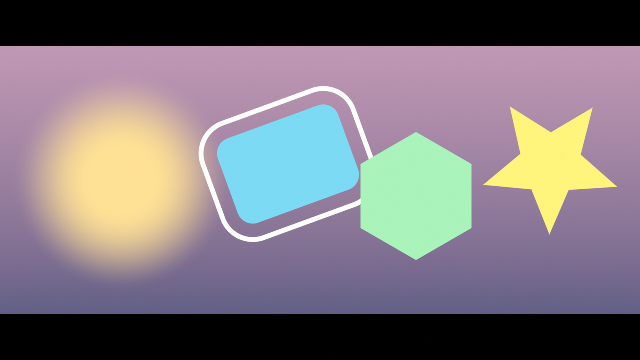
Space and edge#
pixel size#
Size of one pixel of the image in its uniform coordinates: 2 over its larger side
compositor graph "pixel size"(image: Color) -> Float| Input | Type | Default | Range |
|---|---|---|---|
image | Color |
shape space#
Uniform coordinates of the image, moved to center and turned by angle: where a shape is drawn
compositor graph "shape space"(
    image: Color,
    center: Vector = (0.0, 0.0),
    angle: Float(subtype: ANGLE)
) -> Vector| Input | Type | Default | Range |
|---|---|---|---|
image | Color | ||
center | Vector | (0.0, 0.0) | |
angle | Float |
sdf mask#
Mask of a signed distance: 1 inside, 0 outside, its edge smoothed over one pixel plus feather
compositor graph "sdf mask"(image: Color, distance: Float, feather: Float in 0.0..) -> Float| Input | Type | Default | Range |
|---|---|---|---|
image | Color | ||
distance | Float | ||
feather | Float | 0.0.. |
outline mask#
Mask of a line of given width along the edge of a shape, from its Distance
compositor graph "outline mask"(
    image: Color,
    distance: Float,
    width: Float = 0.02 in 0.0..,
    feather: Float in 0.0..
) -> Float| Input | Type | Default | Range |
|---|---|---|---|
image | Color | ||
distance | Float | ||
width | Float | 0.02 | 0.0.. |
feather | Float | 0.0.. |
Shapes#
circle mask#
Disk of given radius
compositor graph "circle mask"(
    image: Color,
    radius: Float = 0.5 in 0.0..,
    feather: Float in 0.0..,
    center: Vector = (0.0, 0.0)
) -> (Mask: Float, Distance: Float)| Input | Type | Default | Range |
|---|---|---|---|
image | Color | ||
radius | Float | 0.5 | 0.0.. |
feather | Float | 0.0.. | |
center | Vector | (0.0, 0.0) |
box mask#
Rectangle of given half size, its corners rounded by roundness
compositor graph "box mask"(
    image: Color,
    "half size": Vector = (0.6, 0.4),
    roundness: Float = 0.1 in 0.0..,
    feather: Float in 0.0..,
    "Transform"(default_closed: true) {
        center: Vector = (0.0, 0.0),
        angle: Float(subtype: ANGLE)
    }
) -> (Mask: Float, Distance: Float)| Input | Type | Default | Range |
|---|---|---|---|
image | Color | ||
half_size | Vector | (0.6, 0.4) | |
roundness | Float | 0.1 | 0.0.. |
feather | Float | 0.0.. | |
center | Vector | (0.0, 0.0) | |
angle | Float |
polygon mask#
Regular polygon of given number of sides
compositor graph "polygon mask"(
    image: Color,
    radius: Float = 0.5 in 0.0..,
    sides: Int = 6 in 3..64,
    feather: Float in 0.0..,
    "Transform"(default_closed: true) {
        center: Vector = (0.0, 0.0),
        angle: Float(subtype: ANGLE)
    }
) -> (Mask: Float, Distance: Float)| Input | Type | Default | Range |
|---|---|---|---|
image | Color | ||
radius | Float | 0.5 | 0.0.. |
sides | Int | 6 | 3..64 |
feather | Float | 0.0.. | |
center | Vector | (0.0, 0.0) | |
angle | Float |
star mask#
Regular star of given number of points, indent its inner radius over its outer one
compositor graph "star mask"(
    image: Color,
    radius: Float = 0.5 in 0.0..,
    points: Int = 5 in 3..32,
    indent: Float = 0.5 in 0.05..1.0,
    feather: Float in 0.0..,
    "Transform"(default_closed: true) {
        center: Vector = (0.0, 0.0),
        angle: Float(subtype: ANGLE)
    }
) -> (Mask: Float, Distance: Float)| Input | Type | Default | Range |
|---|---|---|---|
image | Color | ||
radius | Float | 0.5 | 0.0.. |
points | Int | 5 | 3..32 |
indent | Float | 0.5 | 0.05..1.0 |
feather | Float | 0.0.. | |
center | Vector | (0.0, 0.0) | |
angle | Float |
Framing#
letterbox#
Bars that frame the image to the given aspect: above and below, or at the sides when narrower
compositor graph letterbox(
    image: Color,
    aspect: Float = 2.39 in 0.01..,
    color: Color = (0.0, 0.0, 0.0, 1.0),
    feather: Float in 0.0..
) -> (Image: Color, Mask: Float)| Input | Type | Default | Range |
|---|---|---|---|
image | Color | ||
aspect | Float | 2.39 | 0.01.. |
color | Color | (0.0, 0.0, 0.0, 1.0) | |
feather | Float | 0.0.. |