merge
Compositor Merge operations on premultiplied images: Porter-Duff over, under, in, out, atop, xor, stencil, mask, and plus, minus, multiply, screen, divide, difference, hypot; premult, unpremult, keymix
| Targets | blender-compositor |
|---|---|
| Version | 0.13.1 (edition 2026) |
| Depends on | — |
| Import | use merge or use merge (name, …) |
| Source | stdlib/merge.bn · example examples/merge_showcase.bn |
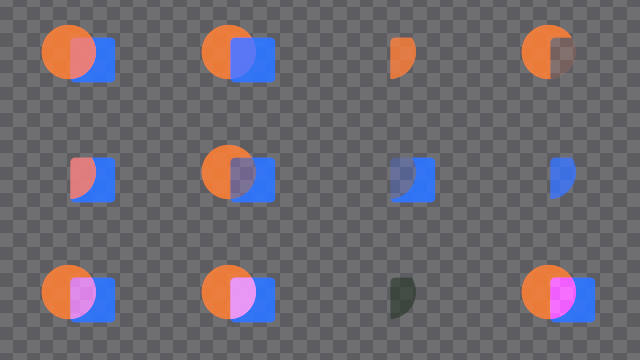
The Merge operations of compositing, on premultiplied images as the compositor gives them. Each one puts the image a over the image b, as in fg |> over(bg), and works on the four channels: the formula of its comment is the one of red, green, blue and alpha alike, a and b being the alphas of the two images. mix and mask fade the result back to b: b where they are 0. in, out, atop, stencil and mask are the operators of Porter and Duff; exclusive or is their xor, a word the language keeps.
Alpha#
alpha of#
Alpha of the image
compositor graph "alpha of"(image: Color) -> Float| Input | Type | Default | Range |
|---|---|---|---|
image | Color |
not in a shader tree: SeparateColor has no output 'alpha'; outputs: red, green, blue
with alpha#
The colors of the image with this alpha, unchanged
compositor graph "with alpha"(image: Color, alpha: Float = 1.0) -> Color| Input | Type | Default | Range |
|---|---|---|---|
image | Color | ||
alpha | Float | 1.0 |
premult#
Colors multiplied by the alpha: a straight image made premultiplied
compositor graph premult(image: Color) -> Color| Input | Type | Default | Range |
|---|---|---|---|
image | Color |
unpremult#
Colors divided by the alpha, 0 where it is 0: a premultiplied image made straight
compositor graph unpremult(image: Color) -> Color| Input | Type | Default | Range |
|---|---|---|---|
image | Color |
copy alpha#
The colors of the image with the alpha of another
compositor graph "copy alpha"(image: Color, from: Color) -> Color| Input | Type | Default | Range |
|---|---|---|---|
image | Color | ||
from | Color |
Combining#
weighted sum#
a times wa plus b times wb, on the four channels
compositor graph "weighted sum"(a: Color, wa: Float = 1.0, b: Color, wb: Float = 1.0) -> Color| Input | Type | Default | Range |
|---|---|---|---|
a | Color | ||
wa | Float | 1.0 | |
b | Color | ||
wb | Float | 1.0 |
keymix#
a where the mask is 1, b where it is 0, on the four channels
compositor graph keymix(
    a: Color,
    b: Color,
    mask: Float = 1.0 in 0.0..1.0,
    mix: Float = 1.0 in 0.0..1.0
) -> Color| Input | Type | Default | Range |
|---|---|---|---|
a | Color | ||
b | Color | ||
mask | Float | 1.0 | 0.0..1.0 |
mix | Float | 1.0 | 0.0..1.0 |
channel sqrt#
Square root of each of the four channels, 0 below 0
compositor graph "channel sqrt"(image: Color) -> Color| Input | Type | Default | Range |
|---|---|---|---|
image | Color |
not in a shader tree: SeparateColor has no output 'alpha'; outputs: red, green, blue
Porter-Duff#
over#
A + B(1 - a): a in front of b
compositor graph over(
    a: Color,
    b: Color,
    mix: Float = 1.0 in 0.0..1.0,
    mask: Float = 1.0 in 0.0..1.0
) -> Color| Input | Type | Default | Range |
|---|---|---|---|
a | Color | ||
b | Color | ||
mix | Float | 1.0 | 0.0..1.0 |
mask | Float | 1.0 | 0.0..1.0 |
under#
A(1 - b) + B: a behind b
compositor graph under(
    a: Color,
    b: Color,
    mix: Float = 1.0 in 0.0..1.0,
    mask: Float = 1.0 in 0.0..1.0
) -> Color| Input | Type | Default | Range |
|---|---|---|---|
a | Color | ||
b | Color | ||
mix | Float | 1.0 | 0.0..1.0 |
mask | Float | 1.0 | 0.0..1.0 |
in#
Ab: a where b is
compositor graph in(
    a: Color,
    b: Color,
    mix: Float = 1.0 in 0.0..1.0,
    mask: Float = 1.0 in 0.0..1.0
) -> Color| Input | Type | Default | Range |
|---|---|---|---|
a | Color | ||
b | Color | ||
mix | Float | 1.0 | 0.0..1.0 |
mask | Float | 1.0 | 0.0..1.0 |
out#
A(1 - b): a where b is not
compositor graph out(
    a: Color,
    b: Color,
    mix: Float = 1.0 in 0.0..1.0,
    mask: Float = 1.0 in 0.0..1.0
) -> Color| Input | Type | Default | Range |
|---|---|---|---|
a | Color | ||
b | Color | ||
mix | Float | 1.0 | 0.0..1.0 |
mask | Float | 1.0 | 0.0..1.0 |
atop#
Ab + B(1 - a): a over b, only where b is
compositor graph atop(
    a: Color,
    b: Color,
    mix: Float = 1.0 in 0.0..1.0,
    mask: Float = 1.0 in 0.0..1.0
) -> Color| Input | Type | Default | Range |
|---|---|---|---|
a | Color | ||
b | Color | ||
mix | Float | 1.0 | 0.0..1.0 |
mask | Float | 1.0 | 0.0..1.0 |
exclusive or#
A(1 - b) + B(1 - a): a and b where the other is not (xor)
compositor graph "exclusive or"(
    a: Color,
    b: Color,
    mix: Float = 1.0 in 0.0..1.0,
    mask: Float = 1.0 in 0.0..1.0
) -> Color| Input | Type | Default | Range |
|---|---|---|---|
a | Color | ||
b | Color | ||
mix | Float | 1.0 | 0.0..1.0 |
mask | Float | 1.0 | 0.0..1.0 |
stencil#
B(1 - a): b with a cut out of it
compositor graph stencil(
    a: Color,
    b: Color,
    mix: Float = 1.0 in 0.0..1.0,
    mask: Float = 1.0 in 0.0..1.0
) -> Color| Input | Type | Default | Range |
|---|---|---|---|
a | Color | ||
b | Color | ||
mix | Float | 1.0 | 0.0..1.0 |
mask | Float | 1.0 | 0.0..1.0 |
mask#
Ba: b only where a is
compositor graph mask(
    a: Color,
    b: Color,
    mix: Float = 1.0 in 0.0..1.0,
    mask: Float = 1.0 in 0.0..1.0
) -> Color| Input | Type | Default | Range |
|---|---|---|---|
a | Color | ||
b | Color | ||
mix | Float | 1.0 | 0.0..1.0 |
mask | Float | 1.0 | 0.0..1.0 |
matte#
Aa + B(1 - a): over, for a straight (unpremultiplied) a
compositor graph matte(
    a: Color,
    b: Color,
    mix: Float = 1.0 in 0.0..1.0,
    mask: Float = 1.0 in 0.0..1.0
) -> Color| Input | Type | Default | Range |
|---|---|---|---|
a | Color | ||
b | Color | ||
mix | Float | 1.0 | 0.0..1.0 |
mask | Float | 1.0 | 0.0..1.0 |
conjoint over#
A + B(1 - a)/b, A where a > b: over for a and b that share their edges
compositor graph "conjoint over"(
    a: Color,
    b: Color,
    mix: Float = 1.0 in 0.0..1.0,
    mask: Float = 1.0 in 0.0..1.0
) -> Color| Input | Type | Default | Range |
|---|---|---|---|
a | Color | ||
b | Color | ||
mix | Float | 1.0 | 0.0..1.0 |
mask | Float | 1.0 | 0.0..1.0 |
disjoint over#
A + B where a + b < 1, A + B(1 - a)/b elsewhere: over for a and b that do not overlap
compositor graph "disjoint over"(
    a: Color,
    b: Color,
    mix: Float = 1.0 in 0.0..1.0,
    mask: Float = 1.0 in 0.0..1.0
) -> Color| Input | Type | Default | Range |
|---|---|---|---|
a | Color | ||
b | Color | ||
mix | Float | 1.0 | 0.0..1.0 |
mask | Float | 1.0 | 0.0..1.0 |
Arithmetic#
copy#
A: a in place of b
compositor graph copy(
    a: Color,
    b: Color,
    mix: Float = 1.0 in 0.0..1.0,
    mask: Float = 1.0 in 0.0..1.0
) -> Color| Input | Type | Default | Range |
|---|---|---|---|
a | Color | ||
b | Color | ||
mix | Float | 1.0 | 0.0..1.0 |
mask | Float | 1.0 | 0.0..1.0 |
plus#
A + B
compositor graph plus(
    a: Color,
    b: Color,
    mix: Float = 1.0 in 0.0..1.0,
    mask: Float = 1.0 in 0.0..1.0
) -> Color| Input | Type | Default | Range |
|---|---|---|---|
a | Color | ||
b | Color | ||
mix | Float | 1.0 | 0.0..1.0 |
mask | Float | 1.0 | 0.0..1.0 |
minus#
A - B
compositor graph minus(
    a: Color,
    b: Color,
    mix: Float = 1.0 in 0.0..1.0,
    mask: Float = 1.0 in 0.0..1.0
) -> Color| Input | Type | Default | Range |
|---|---|---|---|
a | Color | ||
b | Color | ||
mix | Float | 1.0 | 0.0..1.0 |
mask | Float | 1.0 | 0.0..1.0 |
from#
B - A: a taken from b
compositor graph from(
    a: Color,
    b: Color,
    mix: Float = 1.0 in 0.0..1.0,
    mask: Float = 1.0 in 0.0..1.0
) -> Color| Input | Type | Default | Range |
|---|---|---|---|
a | Color | ||
b | Color | ||
mix | Float | 1.0 | 0.0..1.0 |
mask | Float | 1.0 | 0.0..1.0 |
average#
(A + B) / 2
compositor graph average(
    a: Color,
    b: Color,
    mix: Float = 1.0 in 0.0..1.0,
    mask: Float = 1.0 in 0.0..1.0
) -> Color| Input | Type | Default | Range |
|---|---|---|---|
a | Color | ||
b | Color | ||
mix | Float | 1.0 | 0.0..1.0 |
mask | Float | 1.0 | 0.0..1.0 |
multiply#
AB
compositor graph multiply(
    a: Color,
    b: Color,
    mix: Float = 1.0 in 0.0..1.0,
    mask: Float = 1.0 in 0.0..1.0
) -> Color| Input | Type | Default | Range |
|---|---|---|---|
a | Color | ||
b | Color | ||
mix | Float | 1.0 | 0.0..1.0 |
mask | Float | 1.0 | 0.0..1.0 |
divide#
A / B, 0 where B is 0
compositor graph divide(
    a: Color,
    b: Color,
    mix: Float = 1.0 in 0.0..1.0,
    mask: Float = 1.0 in 0.0..1.0
) -> Color| Input | Type | Default | Range |
|---|---|---|---|
a | Color | ||
b | Color | ||
mix | Float | 1.0 | 0.0..1.0 |
mask | Float | 1.0 | 0.0..1.0 |
screen#
A + B - AB: lightens, as two projectors on one screen
compositor graph screen(
    a: Color,
    b: Color,
    mix: Float = 1.0 in 0.0..1.0,
    mask: Float = 1.0 in 0.0..1.0
) -> Color| Input | Type | Default | Range |
|---|---|---|---|
a | Color | ||
b | Color | ||
mix | Float | 1.0 | 0.0..1.0 |
mask | Float | 1.0 | 0.0..1.0 |
maximum#
max(A, B), channel by channel
compositor graph maximum(
    a: Color,
    b: Color,
    mix: Float = 1.0 in 0.0..1.0,
    mask: Float = 1.0 in 0.0..1.0
) -> Color| Input | Type | Default | Range |
|---|---|---|---|
a | Color | ||
b | Color | ||
mix | Float | 1.0 | 0.0..1.0 |
mask | Float | 1.0 | 0.0..1.0 |
minimum#
min(A, B), channel by channel
compositor graph minimum(
    a: Color,
    b: Color,
    mix: Float = 1.0 in 0.0..1.0,
    mask: Float = 1.0 in 0.0..1.0
) -> Color| Input | Type | Default | Range |
|---|---|---|---|
a | Color | ||
b | Color | ||
mix | Float | 1.0 | 0.0..1.0 |
mask | Float | 1.0 | 0.0..1.0 |
difference#
|A - B|
compositor graph difference(
    a: Color,
    b: Color,
    mix: Float = 1.0 in 0.0..1.0,
    mask: Float = 1.0 in 0.0..1.0
) -> Color| Input | Type | Default | Range |
|---|---|---|---|
a | Color | ||
b | Color | ||
mix | Float | 1.0 | 0.0..1.0 |
mask | Float | 1.0 | 0.0..1.0 |
hypot#
sqrt(A² + B²): a sum of two images that keeps the brighter one
compositor graph hypot(
    a: Color,
    b: Color,
    mix: Float = 1.0 in 0.0..1.0,
    mask: Float = 1.0 in 0.0..1.0
) -> Color| Input | Type | Default | Range |
|---|---|---|---|
a | Color | ||
b | Color | ||
mix | Float | 1.0 | 0.0..1.0 |
mask | Float | 1.0 | 0.0..1.0 |
geometric#
2AB / (A + B), 0 where A + B is 0
compositor graph geometric(
    a: Color,
    b: Color,
    mix: Float = 1.0 in 0.0..1.0,
    mask: Float = 1.0 in 0.0..1.0
) -> Color| Input | Type | Default | Range |
|---|---|---|---|
a | Color | ||
b | Color | ||
mix | Float | 1.0 | 0.0..1.0 |
mask | Float | 1.0 | 0.0..1.0 |