grade
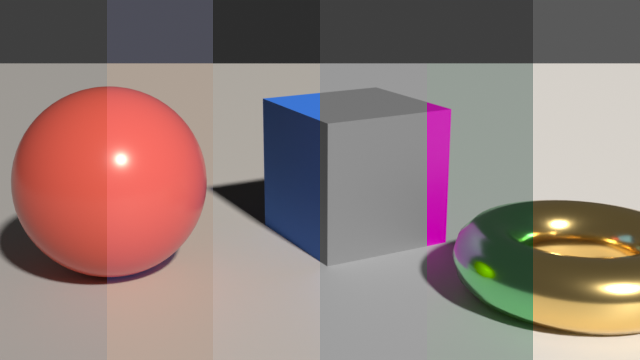
Compositor colour tools on premultiplied images: Nuke's Grade and ColorCorrect, saturation by Rec. 709, Rec. 2020 or ACEScg luma, hue shift, exposure in stops, soft clip, clamp, Cineon log2lin and lin2log
| Targets | blender-compositor |
|---|---|
| Version | 0.13.1 (edition 2026) |
| Depends on | merge |
| Import | use grade or use grade (name, …) |
| Source | stdlib/grade.bn · example examples/grade_showcase.bn |
The colour tools of compositing, on premultiplied images as the compositor gives them: each one grades the colours divided by the alpha, multiplies them by it again and leaves the alpha alone. Where the alpha is 0 the colours stay 0. mix and mask fade the result back to the image: the image where they are 0. A parameter given per channel is a Vector of red, green and blue, as x, y and z: a Color would not take a value below 0. A negative value goes through a power as it is, as a gamma leaves it: only the positive part is raised.
Channels#
signed pow#
x to the exponent where it is positive, x itself where it is not
compositor graph "signed pow"(x: Float, exponent: Float = 1.0) -> Float| Input | Type | Default | Range |
|---|---|---|---|
x | Float | ||
exponent | Float | 1.0 |
rec709 luma#
Luminance of the colours by the weights of Rec. 709
compositor graph "rec709 luma"(image: Color) -> Float| Input | Type | Default | Range |
|---|---|---|---|
image | Color |
gray of#
A gray of this value on the three channels, with this alpha
compositor graph "gray of"(value: Float, alpha: Float = 1.0) -> Color| Input | Type | Default | Range |
|---|---|---|---|
value | Float | ||
alpha | Float | 1.0 |
not in a shader tree: CombineColor has no input 'alpha'; inputs: red, green, blue
graded image#
The graded colours, straight, made premultiplied and faded back to the image by mix and mask
compositor graph "graded image"(
    image: Color,
    graded: Color,
    mix: Float = 1.0,
    mask: Float = 1.0
) -> Color| Input | Type | Default | Range |
|---|---|---|---|
image | Color | ||
graded | Color | ||
mix | Float | 1.0 | |
mask | Float | 1.0 |
Grade#
grade channel#
pow(A x + B, 1/gamma), A = multiply (gain - lift) / (whitepoint - blackpoint), B = offset + lift - A blackpoint; reverse undoes it
compositor graph "grade channel"(
    x: Float,
    blackpoint: Float,
    whitepoint: Float = 1.0,
    lift: Float,
    gain: Float = 1.0,
    multiply: Float = 1.0,
    offset: Float,
    gamma: Float = 1.0,
    reverse: Bool,
    clamp_black: Bool = true,
    clamp_white: Bool
) -> Float| Input | Type | Default | Range |
|---|---|---|---|
x | Float | ||
blackpoint | Float | ||
whitepoint | Float | 1.0 | |
lift | Float | ||
gain | Float | 1.0 | |
multiply | Float | 1.0 | |
offset | Float | ||
gamma | Float | 1.0 | |
reverse | Bool | ||
clamp_black | Bool | true | |
clamp_white | Bool |
grade#
Nuke's Grade: blackpoint to 0 and whitepoint to 1, then lift, gain, multiply, offset and gamma, per channel; reverse undoes it
compositor graph grade(
    image: Color,
    blackpoint: Vector = (0.0, 0.0, 0.0),
    whitepoint: Vector = (1.0, 1.0, 1.0),
    lift: Vector = (0.0, 0.0, 0.0),
    gain: Vector = (1.0, 1.0, 1.0),
    multiply: Vector = (1.0, 1.0, 1.0),
    offset: Vector = (0.0, 0.0, 0.0),
    gamma: Vector = (1.0, 1.0, 1.0),
    reverse: Bool,
    clamp_black: Bool = true,
    clamp_white: Bool,
    mix: Float = 1.0 in 0.0..1.0,
    mask: Float = 1.0 in 0.0..1.0
) -> Color| Input | Type | Default | Range |
|---|---|---|---|
image | Color | ||
blackpoint | Vector | (0.0, 0.0, 0.0) | |
whitepoint | Vector | (1.0, 1.0, 1.0) | |
lift | Vector | (0.0, 0.0, 0.0) | |
gain | Vector | (1.0, 1.0, 1.0) | |
multiply | Vector | (1.0, 1.0, 1.0) | |
offset | Vector | (0.0, 0.0, 0.0) | |
gamma | Vector | (1.0, 1.0, 1.0) | |
reverse | Bool | ||
clamp_black | Bool | true | |
clamp_white | Bool | ||
mix | Float | 1.0 | 0.0..1.0 |
mask | Float | 1.0 | 0.0..1.0 |
Colour correct#
correct channel#
Saturation around the luma, contrast around 0.18, gamma, gain then offset: one range of a colour correct
compositor graph "correct channel"(
    x: Float,
    luma: Float,
    saturation: Float = 1.0,
    contrast: Float = 1.0,
    gamma: Float = 1.0,
    gain: Float = 1.0,
    offset: Float
) -> Float| Input | Type | Default | Range |
|---|---|---|---|
x | Float | ||
luma | Float | ||
saturation | Float | 1.0 | |
contrast | Float | 1.0 | |
gamma | Float | 1.0 | |
gain | Float | 1.0 | |
offset | Float |
correct range#
The colours of a straight image through one range of a colour correct
compositor graph "correct range"(
    image: Color,
    saturation: Float = 1.0,
    contrast: Float = 1.0,
    gamma: Float = 1.0,
    gain: Float = 1.0,
    offset: Float
) -> Color| Input | Type | Default | Range |
|---|---|---|---|
image | Color | ||
saturation | Float | 1.0 | |
contrast | Float | 1.0 | |
gamma | Float | 1.0 | |
gain | Float | 1.0 | |
offset | Float |
not in a shader tree: SeparateColor has no output 'alpha'; outputs: red, green, blue
color correct#
Nuke's ColorCorrect: saturation, contrast, gamma, gain and offset of the master times those of the shadows, midtones and highlights, mixed by the luma
compositor graph "color correct"(
    image: Color,
    mix: Float = 1.0 in 0.0..1.0,
    mask: Float = 1.0 in 0.0..1.0,
    "Master" {
        saturation: Float = 1.0 in 0.0..,
        contrast: Float = 1.0 in 0.0..,
        gamma: Float = 1.0 in 0.0..,
        gain: Float = 1.0,
        offset: Float
    },
    "Shadows"(default_closed: true) {
        "shadows saturation": Float = 1.0 in 0.0..,
        "shadows contrast": Float = 1.0 in 0.0..,
        "shadows gamma": Float = 1.0 in 0.0..,
        "shadows gain": Float = 1.0,
        "shadows offset": Float
    },
    "Midtones"(default_closed: true) {
        "midtones saturation": Float = 1.0 in 0.0..,
        "midtones contrast": Float = 1.0 in 0.0..,
        "midtones gamma": Float = 1.0 in 0.0..,
        "midtones gain": Float = 1.0,
        "midtones offset": Float
    },
    "Highlights"(default_closed: true) {
        "highlights saturation": Float = 1.0 in 0.0..,
        "highlights contrast": Float = 1.0 in 0.0..,
        "highlights gamma": Float = 1.0 in 0.0..,
        "highlights gain": Float = 1.0,
        "highlights offset": Float
    },
    "Ranges"(default_closed: true) {
        "shadows start": Float,
        "shadows end": Float = 0.09,
        "highlights start": Float = 0.5,
        "highlights end": Float = 1.0
    }
) -> Color| Input | Type | Default | Range |
|---|---|---|---|
image | Color | ||
mix | Float | 1.0 | 0.0..1.0 |
mask | Float | 1.0 | 0.0..1.0 |
saturation | Float | 1.0 | 0.0.. |
contrast | Float | 1.0 | 0.0.. |
gamma | Float | 1.0 | 0.0.. |
gain | Float | 1.0 | |
offset | Float | ||
shadows_saturation | Float | 1.0 | 0.0.. |
shadows_contrast | Float | 1.0 | 0.0.. |
shadows_gamma | Float | 1.0 | 0.0.. |
shadows_gain | Float | 1.0 | |
shadows_offset | Float | ||
midtones_saturation | Float | 1.0 | 0.0.. |
midtones_contrast | Float | 1.0 | 0.0.. |
midtones_gamma | Float | 1.0 | 0.0.. |
midtones_gain | Float | 1.0 | |
midtones_offset | Float | ||
highlights_saturation | Float | 1.0 | 0.0.. |
highlights_contrast | Float | 1.0 | 0.0.. |
highlights_gamma | Float | 1.0 | 0.0.. |
highlights_gain | Float | 1.0 | |
highlights_offset | Float | ||
shadows_start | Float | ||
shadows_end | Float | 0.09 | |
highlights_start | Float | 0.5 | |
highlights_end | Float | 1.0 |
Saturation and hue#
saturation#
The colours pushed away from their luma by s, 0 for a gray; the luma by the weights of Rec. 709, Rec. 2020 or ACEScg
compositor graph saturation(
    image: Color,
    s: Float = 1.0 in 0.0..,
    luma: Menu = Rec709,
    mix: Float = 1.0 in 0.0..1.0,
    mask: Float = 1.0 in 0.0..1.0
) -> Color| Input | Type | Default | Range |
|---|---|---|---|
image | Color | ||
s | Float | 1.0 | 0.0.. |
luma | Menu | Ref(name='Rec709', line=244, col=18) | |
mix | Float | 1.0 | 0.0..1.0 |
mask | Float | 1.0 | 0.0..1.0 |
hue shift#
The colours turned by angle around the gray axis: red to green to blue for a positive angle
compositor graph "hue shift"(
    image: Color,
    angle: Float(subtype: ANGLE),
    mix: Float = 1.0 in 0.0..1.0,
    mask: Float = 1.0 in 0.0..1.0
) -> Color| Input | Type | Default | Range |
|---|---|---|---|
image | Color | ||
angle | Float | ||
mix | Float | 1.0 | 0.0..1.0 |
mask | Float | 1.0 | 0.0..1.0 |
Range#
exposure stops#
The colours times 2 to the stops: one stop doubles them
compositor graph "exposure stops"(
    image: Color,
    stops: Float,
    mix: Float = 1.0 in 0.0..1.0,
    mask: Float = 1.0 in 0.0..1.0
) -> Color| Input | Type | Default | Range |
|---|---|---|---|
image | Color | ||
stops | Float | ||
mix | Float | 1.0 | 0.0..1.0 |
mask | Float | 1.0 | 0.0..1.0 |
soft clip channel#
x below start; above, limit - k exp(-(x - start) / k), k = limit - start: nearing limit, never reaching it
compositor graph "soft clip channel"(x: Float, start: Float = 0.8, limit: Float = 1.0) -> Float| Input | Type | Default | Range |
|---|---|---|---|
x | Float | ||
start | Float | 0.8 | |
limit | Float | 1.0 |
soft clip#
Colours above start bent smoothly toward limit, never past it, channel by channel
compositor graph "soft clip"(
    image: Color,
    start: Float = 0.8,
    limit: Float = 1.0,
    mix: Float = 1.0 in 0.0..1.0,
    mask: Float = 1.0 in 0.0..1.0
) -> Color| Input | Type | Default | Range |
|---|---|---|---|
image | Color | ||
start | Float | 0.8 | |
limit | Float | 1.0 | |
mix | Float | 1.0 | 0.0..1.0 |
mask | Float | 1.0 | 0.0..1.0 |
clamp channels#
The colours kept between low and high, channel by channel
compositor graph "clamp channels"(
    image: Color,
    low: Vector = (0.0, 0.0, 0.0),
    high: Vector = (1.0, 1.0, 1.0),
    mix: Float = 1.0 in 0.0..1.0,
    mask: Float = 1.0 in 0.0..1.0
) -> Color| Input | Type | Default | Range |
|---|---|---|---|
image | Color | ||
low | Vector | (0.0, 0.0, 0.0) | |
high | Vector | (1.0, 1.0, 1.0) | |
mix | Float | 1.0 | 0.0..1.0 |
mask | Float | 1.0 | 0.0..1.0 |
Cineon#
cineon offset#
The linear value of the black of a Cineon log, before it is taken to 0
compositor graph "cineon offset"(
    black: Float = 95.0,
    white: Float = 685.0,
    gamma: Float = 0.6
) -> Float| Input | Type | Default | Range |
|---|---|---|---|
black | Float | 95.0 | |
white | Float | 685.0 | |
gamma | Float | 0.6 |
log2lin channel#
(10^((1023 x - white) 0.002 / gamma) - offset) / (1 - offset): a Cineon code over 1023 made linear
compositor graph "log2lin channel"(
    x: Float,
    black: Float = 95.0,
    white: Float = 685.0,
    gamma: Float = 0.6
) -> Float| Input | Type | Default | Range |
|---|---|---|---|
x | Float | ||
black | Float | 95.0 | |
white | Float | 685.0 | |
gamma | Float | 0.6 |
lin2log channel#
(white + log10(x (1 - offset) + offset) gamma / 0.002) / 1023: a linear value made a Cineon code over 1023
compositor graph "lin2log channel"(
    x: Float,
    black: Float = 95.0,
    white: Float = 685.0,
    gamma: Float = 0.6
) -> Float| Input | Type | Default | Range |
|---|---|---|---|
x | Float | ||
black | Float | 95.0 | |
white | Float | 685.0 | |
gamma | Float | 0.6 |
log2lin#
Cineon log colours, codes over 1023, made linear: black to 0, white to 1
compositor graph log2lin(
    image: Color,
    black: Float = 95.0 in 0.0..1023.0,
    white: Float = 685.0 in 0.0..1023.0,
    gamma: Float = 0.6 in 0.0..
) -> Color| Input | Type | Default | Range |
|---|---|---|---|
image | Color | ||
black | Float | 95.0 | 0.0..1023.0 |
white | Float | 685.0 | 0.0..1023.0 |
gamma | Float | 0.6 | 0.0.. |
lin2log#
Linear colours made Cineon log, codes over 1023: 0 to black, 1 to white
compositor graph lin2log(
    image: Color,
    black: Float = 95.0 in 0.0..1023.0,
    white: Float = 685.0 in 0.0..1023.0,
    gamma: Float = 0.6 in 0.0..
) -> Color| Input | Type | Default | Range |
|---|---|---|---|
image | Color | ||
black | Float | 95.0 | 0.0..1023.0 |
white | Float | 685.0 | 0.0..1023.0 |
gamma | Float | 0.6 | 0.0.. |