stmap
Compositor image remapping by STMaps after Nuke's STMap: the identity UV ramp, an STMap applied with its alpha as coverage, Tile with mirror, Mirror, Reformat to a size by fit, fill or distort, each as its STMap and its image
| Targets | blender-compositor |
|---|---|
| Version | 0.13.1 (edition 2026) |
| Depends on | — |
| Import | use stmap or use stmap (name, …) |
| Source | stdlib/stmap.bn · example examples/stmap_showcase.bn |
Image remapping by STMaps, as Nuke's STMap does it: an STMap is an image whose red and green are, for each of its pixels, the place to take the colour from in another image, from 0 to 1 across it, red to the right and green up, at the centres of the pixels: the pixel i of an image of width W is at (i + 0.5) / W. Its alpha is the coverage: 0 where nothing is taken, the result there is transparent. Blue is 0. Each tool comes as its STMap, "… stmap", and as the image remapped by it: the STMap renders the coordinates a tool computes, and can be saved, edited or put together with others. The result has the size of the STMap: an STMap made on a canvas of another size remaps the image to that size.
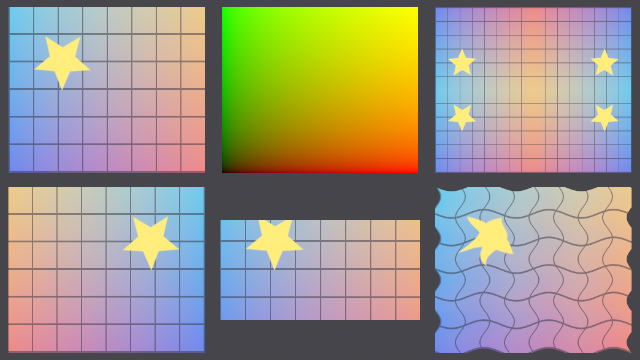
STMaps#
uv ramp#
The identity STMap of the image's size: red is u, green is v, at the centre of each pixel; remapped by it, an image stays as it is
compositor graph "uv ramp"(image: Color) -> Color| Input | Type | Default | Range |
|---|---|---|---|
image | Color |
stmap of#
An STMap's pixel: u in red, v in green, the coverage in alpha
compositor graph "stmap of"(u: Float, v: Float, coverage: Float = 1.0) -> Color| Input | Type | Default | Range |
|---|---|---|---|
u | Float | ||
v | Float | ||
coverage | Float | 1.0 |
not in a shader tree: CombineColor takes 3 input(s): red, green, blue
stmap apply#
The image remapped by the STMap: each pixel the image's colour where the STMap's red and green say, times its alpha; transparent off the image
compositor graph "stmap apply"(
    image: Color,
    stmap: Color,
    interpolation: Menu = Bilinear
) -> Color| Input | Type | Default | Range |
|---|---|---|---|
image | Color | ||
stmap | Color | ||
interpolation | Menu | Ref(name='Bilinear', line=34, col=27) |
canvas#
A canvas of this size, in pixels: the image stretched to it, its pixels made by Pixelate, as Scale alone only sets how the image is drawn, then cropped to the size, as Pixelate rounds an odd one up to even
compositor graph canvas(image: Color, width: Int = 1920, height: Int = 1080) -> Color| Input | Type | Default | Range |
|---|---|---|---|
image | Color | ||
width | Int | 1920 | |
height | Int | 1080 |
aspect of#
The image's width over its height
compositor graph "aspect of"(image: Color) -> Float| Input | Type | Default | Range |
|---|---|---|---|
image | Color |
Tile and mirror#
repeat axis#
The part of t past its floor; in every other tile turned back when mirror is set
compositor graph "repeat axis"(t: Float, mirror: Bool) -> Float| Input | Type | Default | Range |
|---|---|---|---|
t | Float | ||
mirror | Bool |
tile stmap#
The STMap of the image repeated in rows and columns, each tile the whole image; with mirror, every other tile turned over
compositor graph "tile stmap"(
    image: Color,
    rows: Int = 2 in 1..,
    columns: Int = 2 in 1..,
    mirror: Bool
) -> Color| Input | Type | Default | Range |
|---|---|---|---|
image | Color | ||
rows | Int | 2 | 1.. |
columns | Int | 2 | 1.. |
mirror | Bool |
tile#
Nuke's Tile: the image repeated in rows and columns at its own size; with mirror, every other tile turned over
compositor graph tile(
    image: Color,
    rows: Int = 2 in 1..,
    columns: Int = 2 in 1..,
    mirror: Bool
) -> Color| Input | Type | Default | Range |
|---|---|---|---|
image | Color | ||
rows | Int | 2 | 1.. |
columns | Int | 2 | 1.. |
mirror | Bool |
mirror stmap#
The STMap of the image turned over left to right (horizontal), bottom to top (vertical)
compositor graph "mirror stmap"(image: Color, horizontal: Bool = true, vertical: Bool) -> Color| Input | Type | Default | Range |
|---|---|---|---|
image | Color | ||
horizontal | Bool | true | |
vertical | Bool |
mirror#
Nuke's Mirror: the image turned over left to right (horizontal), bottom to top (vertical)
compositor graph mirror(image: Color, horizontal: Bool = true, vertical: Bool) -> Color| Input | Type | Default | Range |
|---|---|---|---|
image | Color | ||
horizontal | Bool | true | |
vertical | Bool |
Reformat#
reformat stmap#
The STMap of the image put on a canvas of this size: whole and centred (Fit), filling it and cut (Fill), or stretched to it (Distort)
compositor graph "reformat stmap"(
    image: Color,
    width: Int = 1920 in 1..,
    height: Int = 1080 in 1..,
    mode: Menu = Fit
) -> Color| Input | Type | Default | Range |
|---|---|---|---|
image | Color | ||
width | Int | 1920 | 1.. |
height | Int | 1080 | 1.. |
mode | Menu | Ref(name='Fit', line=105, col=18) |
reformat#
Nuke's Reformat: the image on a canvas of this size, whole and centred (Fit), filling it and cut (Fill), or stretched to it (Distort)
compositor graph reformat(
    image: Color,
    width: Int = 1920 in 1..,
    height: Int = 1080 in 1..,
    mode: Menu = Fit
) -> Color| Input | Type | Default | Range |
|---|---|---|---|
image | Color | ||
width | Int | 1920 | 1.. |
height | Int | 1080 | 1.. |
mode | Menu | Ref(name='Fit', line=123, col=18) |